
DG Training’s Canva Course in Dubai is ideal for beginners, such as students or new entrepreneurs, as well as professionals. With a focus on real-world applications, you’ll learn to create professional-grade designs quickly and confidently.
We have designed the course curriculum to help you learn through practical application. You’ll practice the latest design trends and discover how to apply them effectively for marketing teams, start-ups, and agencies. Our goal is to equip you with the latest insights to create an impact and stay abreast of this ever-evolving digital landscape.
Why DG Training?
# KHDA permitted
# Practical Training
# Free Demo Classes
# Job Assistance
# Courses taught by Industry professionals
# Available in Both Online and Offline mode
KHDA-certified course | 4.8⭐ rating from 200+ learners
Enquire Now
51+
Online & Offline Courses
3005+
Students Trained
25+
Expert Faculty
93%
Student Satisfaction Rate
51+
Online & Offline Courses
3005+
Students Trained
25+
Expert Faculty
93%
Student Satisfaction Rate
51+
Online & Offline Courses
3005+
Students Trained
25+
Expert Faculty
93%
Student Satisfaction Rate
What is Adobe Photoshop?
Key Benefits
- What You’ll Gain

Learn Canva from the ground up, even with zero design background. Create professional visuals quickly and easily.
Understand structured design workflows and layout logic beyond basic templates and drag-and-drop.

Create visuals aligned with branding, marketing goals, and platform requirements.

Save time using tools like brand kits, smart layouts, resizing, and collaboration features to deliver high-quality designs quickly.

Learn how Canva is used in real companies, agencies, and startups, making it valuable for designers, marketers, and business owners.
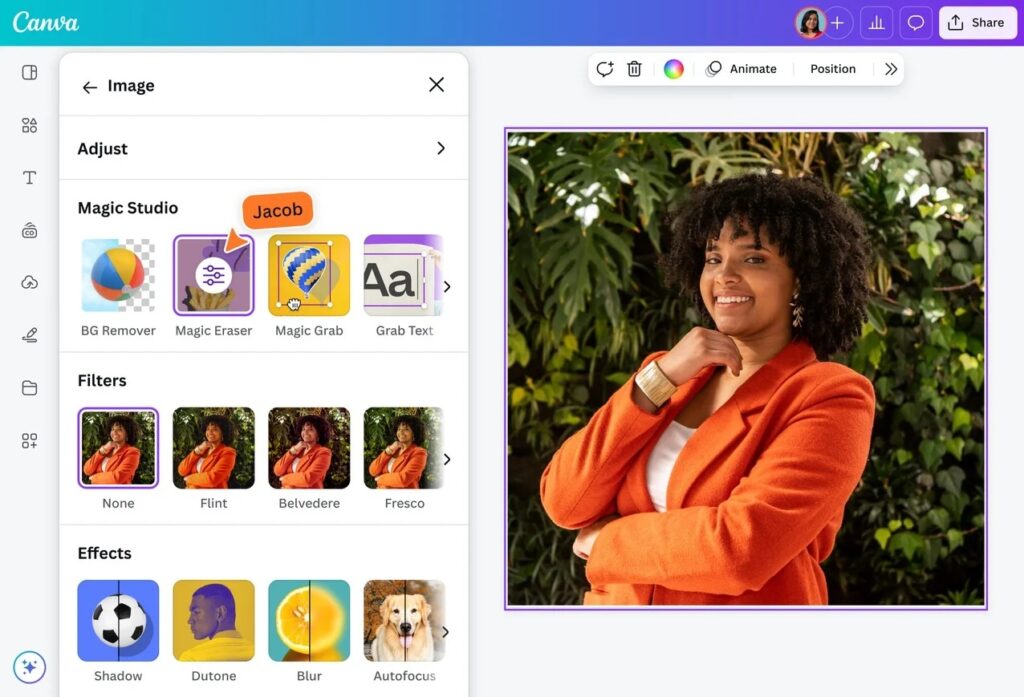
What Will You Learn in Our Canva Course?
- Introduction to Canva dashboard, templates, and elements.
- Basic design and photo corrections, like contrast, cropping, resizing, and photo editing tools.
- Working with selections & elements, grouping, alignment, layers, and layouts.
- Layer Basics in Canva, stacking, managing complex elements, and professional outcome.
- Quick fixes and smart design tools, smart suggestions.
- Using frames as masks for images and videos, cutouts, overlays, and depth styles.
- Typography – font pairing, hierarchy, readability, brand alignment, headline banner texts.
- Vector style graphics and shape designs, such as icons, shapes, logo design, and illustrations.
- Advanced compositing and creative layouts for posters, ads.
- Applying design principles for professional results.
- Editing short videos, reels, transitions, and animations.
- Managing brand colours and ensuring design consistency.
- Creating 3D visual mockups and depth effect.
- Using AI effectively for Canva designs.
Who Should Join?

Beginners and students with no prior design knowledge who want to learn visual design basics in a simple, practical way. This course helps them build confidence to create real designs from day one.

Designers and creative professionals who want to speed up their workflow and use Canva as a support tool alongside Photoshop or Illustrator. This helps them create templates, brand kits, and quick assets.

Marketers and social media professionals who want to design high-converting creatives and keep content consistent across multiple platforms. This also helps reduce dependency on design teams.

Entrepreneurs and business owners who want to design their own brand assets, create presentations, pitch decks, and ads, while saving time and design costs.
Why Choose This Figma Course in Dubai?
- Instructor-led sessions
- Hands-on practical design exercises
- Interactive discussions and live project work
- Live virtual classes
- Same curriculum as classroom training
- Flexible learning from anywhere
- Customized for teams
- Product design–focused or brand-specific workflows
- On-site or online delivery
Where to find us?
Related Courses
InDesign is widely used by graphic designers, marketing professionals, and publishers to produce professional-quality layouts and designs.
Adobe Illustrator Course is a tool for the creative left brainers of the world. With endless tools, Illustrator can revolutionize the way you get creative.
Corel Draw is a graphic based application widely used for logo designing, brochure, pamphlet, product box pack, designing a visiting card, and for various advertisements related to graphic designing.
Testimonials for our Adobe Photoshop Course
Why DG Training For Canva Training?
- Instructor-led sessions
- Hands-on practical learning
- Interactive discussions and live projects
- 30-Minute Free Canva Training Consultation
- Same curriculum as classroom training
- Flexible Online & Offline Schedules
- Customized for teams
- Marketing-focused or brand-specific training
- On-site or online delivery
Where to find us?
FAQs
No, DG training offers a beginner-friendly Canva course. It starts from the basics and covers advanced levels as well.
Yes, professional designers can use Canva as a support tool for speed, quick fixes, and collaboration, too. It is an ideal platform for making quick marketing assets.
Yes, the DG Training Canva course covers advanced and pro-level Canva tools. Our online design courses are perfect for beginners and professional designers alike.
Yes. Both classroom and online Canva training options are available. You can choose either a standalone or a hybrid model after consulting our course representative.